Gun Reviews >
 Find a Dealer >
 Find a Club >
 Competitions >
 videos >
 Reader Survey >
NOCPIX LUMI H35R THERMAL MONOCULAR
- By Chris Parkin
- Last updated: 20/02/2025




Thermal spotters have become so feature-filled, and it’s great to see that handy, compact monoculars aren’t being left behind. Nocpix’s Lumi H35R features a 35mm objective lens and a 640x512 sensor with a 12-micron pitch. The NETD rating is sub-18mK for naturalised thermal gradients on screen, and the unit retains a 50Hz refresh rate for smooth image rendering.
Capped lens
The lens cap fits into the objective lens body, and it stays in position when stored. When removed, it hangs from a cord and magnetically attaches to either side of the Lumi’s body. Image focus is handled via a 48mm serrated rubber collar surrounding the objective lens. It’s well-weighted, offering delicate, detailed focal control of the f/0.9 lens, yet it’s never accidentally nudged out of position. The unit’s armoured body features triangular patterning to aid grip, and it is IP67-rated. The laser rangefinder’s optics are effective up to 800m (or yards) and sit beneath the objective, providing accuracy of ±1m.
Eyepiece
The eyepiece features a 41mm rubber collar to ensure crisp screen focus. This runs from ±5 dioptres for your eyes, with a 10mm exit pupil. The winged rubber shroud around it can be folded down or up to minimise external light leakage and rotated to suit left or right-eye use. I preferred to fold it down completely, as I use monoculars with both eyes, and I appreciated that once folded, it stayed securely in place without springing open. 25mm of eye relief is provided, and I found it forgiving and capable when wearing glasses.
Lens grinding
One of my pet peeves with electronic items is the casual disregard shown for the optical lenses, which are still required, but the Lumi’s ocular lens seemed to be well-ground. Poor lenses only offer a very small sweet spot for focus, and if your eye drifts from it (still within the exit pupil), you end up chasing focus until you realise it’s because you’re not in the sweet spot. The lenses on this Nocpix are among the better ones, offering a generally comfortable and accessible viewing experience. All the icons along the top of the internal 1024×768px AMOLED display appear sharp, with no spherical distortion. The magnification and remaining battery power are notably prominent.
Hanging around
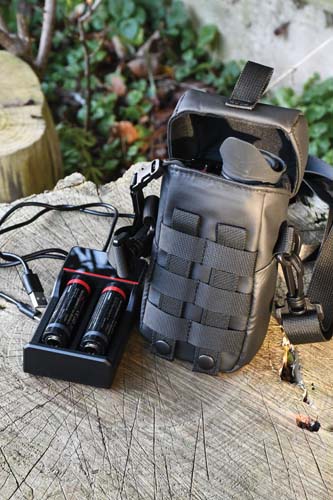
This is a compact and secure unit that’s easy to slip inside the neckline or chest of clothing when not in use, and there are bilateral anchor points for the included neck sling below the eyepiece. The lower, red-highlighted button is a quick-release latch for the battery compartment, and it is probably the fastest I have ever used for quick battery swaps. It’s also secure and can’t be accidentally cross-threaded in a hurry. It doesn’t even matter which way around the battery is inserted, as the electronics can invert. Nocpix supplies three 18650 batteries as well as a USB-compatible charger. This is a great move because it avoids the excessive cost of proprietary battery units (which are often just a housing for a standard cell anyway), and with a quick-swap facility, it’s a real bonus feature. The latch and hinged door are aluminium and feel secure and durable in use. A battery swap honestly takes less than five seconds.
Tripod mounting
The underside of the unit shows a ¼” UNC thread for tripod mounting, and all the control buttons are lined up on top of the Lumi. From front to back, the first button is power on/off, and holding this activates the internal screen after three seconds, with the full image displayed after nine seconds. A quick press switches off the display to conserve battery and prevent light from spilling onto your face. Holding it down longer activates the three-second shutdown warning. Button number two controls magnification and the laser rangefinder. A short press will scroll through 5x, 10x, and 20x digital zoom beyond the 2.5x native optical magnification. A longer press turns on the laser rangefinder, which gives constant readouts every second until another long press switches it off. So bear this in mind in terms of battery usage.
Button three
The third button initiates the primary menu with a short press. Further combinations of button presses (button two up, button four down, button three to select) let you scroll through multiple colour palettes—white, black, red (indicating hot), crimson, viridian, and violet. I stayed in the first three modes, as I think white is the most intuitive, black is the most relaxing with the smoothest topography and landscape texture, and red helps in the latter stages of separation when multiple targets are in close proximity. I never used the others, but Nocpix suggests that red and green monochrome create less eye strain, although they show less detail. The primary menu includes 10-stage controls for brightness, contrast, and overall scene type, generated by AI processing software.
Printed manual
I like a decent printed manual, but unfortunately, while the Nocpix menu gets you started, it contains very little text and relies mainly on pictographic icons for navigation. I was able to figure it out, as I have used many similar units that all offer comparable electronic functionality, but it might be better if you didn’t have to resort to an app for everything. Some shooters just want to buy a thermal spotting tool and not a new hobby. They might not be familiar with the menu functions.
Video/photo
The rearmost button, number four, controls the photo and video functions. Short presses take pictures, and a longer 1.5-second press starts video recording with sound. The internal storage capacity is 32GB, and you can either plug a USB-C cable in to offload your content or connect it to the app via Wi-Fi.
Reliability
Once installed on my iPhone, the Nocpix app connected reliably to the unit, allowing me to easily download the video and photo files. I generally prefer a separate microSD card for ease of access and digital security, but I suppose every additional opening on the case can affect the cost and weatherproofing of the unit.
Battery life
It is suggested that each battery should provide 4.5 hours of life, and although this depends on your Wi-Fi and laser usage, as well as the screen brightness, I didn’t struggle on my usual three-to-four-hour outings. It’s great to have backups in your warm pockets, and using 18650 batteries also ensures compatibility with many other night vision and thermal tools.
I found the Lumi easy to control once I learned the button control ‘language.’ The secondary, detailed menu, accessed with a long press on the third button, allows you to explore deeper, less frequently required functions like ‘Ultra Clear’ mode, Wi-Fi, image hue, microphone, automated or manual screen calibration, and the image gallery for playback. The ‘Settings’ menu allows for time/date alterations, language selection, metres or yards, electronic image stabilisation, and finally, the firmware version and factory restore.
Logical layout
I liked the menu’s logical order in terms of the likelihood of needing to adjust certain functions, and the menus were simple, with just up/down and select options. I also liked that if you entered the wrong menu, you could go back instantly with the on/off button, and nothing ever electronically crashed. The menus stayed active for about seven seconds without additional control inputs, so you never got stuck in the wrong place. I never had to remove the battery and restart the unit to resolve this type of issue, which I have experienced many times with other products.
Compact tool
The Lumi weighs just 385g and measures 147×47×74mm, making it easy to store, and I like the fact that you also receive a compact, protective Cordura case and an additional shoulder strap. Having the unit immediately on hand enabled me to quickly scan any environment with minimal noise and physical movement. However, when I wanted a closer look, to zoom in, focus, or film, both hands were needed for stability while pressing buttons that weren’t individually distinguishable, requiring me to count along from the front. Remember to keep your thumb out of the way of the laser too, because when focusing, it can block the lens.
I appreciated the Lumi as a hunting companion. I still prefer to watch quarry moving and reacting for identification rather than just relying on ultimate image resolution alone. The Lumi seems to strike a very good balance between these factors at a reasonable cost, and subtle details like high-quality ocular lenses stand out to me. The maximum detection range is rated at 1,800m, and I certainly don’t feel I missed out on detecting any quarry. With decent identification capability at 300 to 350m, particularly if the animal was moving, the 10mm exit pupil felt relaxed and immersive, thanks to its better-than-average ocular lens.

click on image to enlarge

click on image to enlarge

click on image to enlarge

click on image to enlarge

click on image to enlarge

click on image to enlarge

click on image to enlarge

click on image to enlarge

click on image to enlarge
click on image to enlarge

click on image to enlarge