Gun Reviews >
 Find a Dealer >
 Find a Club >
 Competitions >
 videos >
 Reader Survey >
PIXFRA MILE 2 THERMAL MONOCULARS
- Last updated: 04/10/2024




Thomas Jacks is well known as the UK distributor for Pulsar, a benchmark brand for quality and performance in thermal optics. Less well known, perhaps, is that they also handle the Chinese brand, Pixfra, providing an alternative route into thermal for users seeking a more affordable product, or a different form factor. Indeed, it’s the form factor that really makes their latest Mile 2 series monoculars, which are the subject of this review, stand out in a crowded marketplace.
What’s on offer?
There are nine models in the range, based on three different 12µm thermal sensors: an entry-level 256×192 quartet (M207, M210, M215, M215M), a mid-range 384×288 trio (M413, M419, M425), and a top-end 640×512 duo (M619, M625). Prices range from a highly accessible £399.95 for the M207 to a very competitive £1,259.95 for the M625.
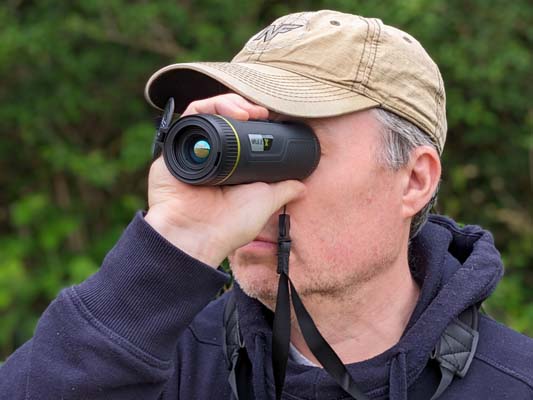
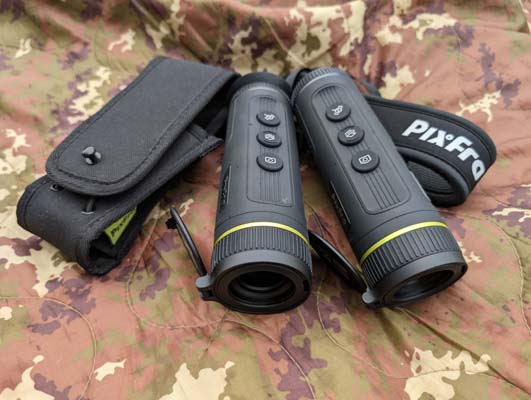
For each of the model numbers above, the final two digits indicate the focal length of the f1.0 lens in mm, and observant readers will note that the largest of these is a seemingly modest 25mm, which brings us back to form factor, since the immediate appeal of the Mile 2 series lies in its clean lines and compact dimensions. All models use a common housing, just 157.5mm long, 56.6mm wide and 50.3mm high, from which nothing protrudes since the projection of the hinge for the objective lens cover is negated by the taper of the lens housing, and the height of the three top-mounted control buttons is matched by the depth of the recessed plane on which they are located. A similar plane is present in the underside of the unit to accommodate the rubber cover for the USB-C port and a tripod socket. The ultimate expression of this fusion of aesthetics and ergonomics is the discreet power control, which is concealed behind the Pixfra badge located on the left-hand side of the housing.
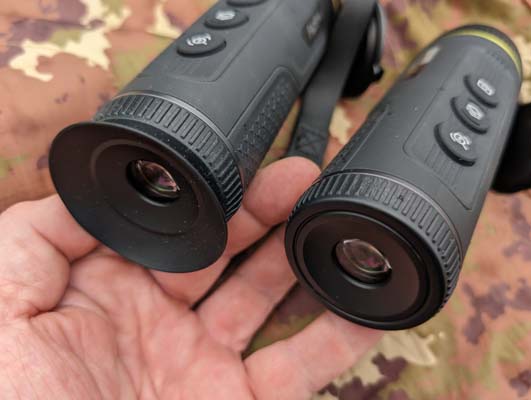
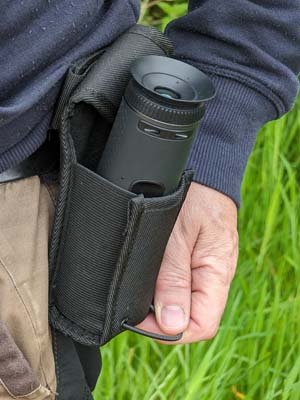
The distinctive cylindrical housing shows a slight taper towards the eyepiece and is rubber-armoured throughout, with a thicker, textured area around the lower half, aiding grip. Grippy, too, are the ribbed rubber collars that provide great control when focusing the eyepiece and objective lens. Exceptions here are the M207, M210 and M215, which have fixed-focus objectives and thus a smooth housing at the front, which makes them even easier to slide into a pocket. The real pleasure of the Mile 2 series is that they are comfortable to hold, quick and silent to deploy and stow, and their small size allows you to carry them in more places since they easily fit into most pockets or pouches. For that matter, Pixfra also includes a dedicated nylon holster with elasticated sides that fits on your belt, providing a perfect solution for jacket-free summer stalks or as an addition to a bino caddy. Additional security in use is provided by the inclusion of both a wrist strap and a neck strap, which thread through a neat slot near the eyepiece. Indeed, the only drawback to the form factor is the physical reality that the Mile 2’s circular profile requires you to be careful where you put it down, as given half the chance, it will roll away!
Interestingly, the box also contains a second rubber eye cup for those who prefer a flanged design to the plain one that comes fitted to the unit. They are easy to swap over, yet entirely secure once fitted. This inclusive approach to design extends to the ambidextrous positioning of the three control buttons on top of the unit, a choice that has value not only to left-handers but to all of us who want to be able to operate a thermal easily with whichever hand we have free in the moment.
It’s all in the details
As for those controls, a long press on the power button under the logo activates the unit or initiates the countdown to shut down. A short press toggles the screen standby mode. Being completely flush with the housing, accidental operation is almost impossible. The same can’t be said for the imaging, palette, and magnification buttons. On the plus side, these are well-sized and spaced for easy selection. However, the pressure required to activate them is too light, leading to unexpected image changes between viewings, and random images saved to the onboard 16GB memory!
The only other external demerit is more a perceived one than an actual problem and has to do with the hinged lens cover. This doesn’t fold flat against the housing and is made from a plastic that feels less than sturdy, creating the impression of being a weak spot in the Mile 2’s otherwise rugged build. This impression, however, could be wrong, as the covers on both units survived the test.
The nitty-gritty
Power comes from a built-in Lithium-ion battery. Bigger sensors use more power, so the runtime is 6.5 hours for the 6-series, 8 hours for the 4-series, and as much as 9.5 hours for the M207. In general, I prefer a removable 18650 battery, but that would require a bulkier housing and would deliver a shorter runtime, so I reckon Pixfra have made the right call with the Mile 2.
Turning now to the imaging tech, all models are equipped with 800x600px, 0.32” OLED colour displays, enabling a selection of six colour palettes: white-hot, black-hot, green, iron-hot, sepia and ‘alarm’ (white hot with the hottest areas highlighted in red). There are also coloured on-screen icons, such as the pointer for the built-in compass, and full-colour JPG image and MP4 video capture (both at a lowish 640x512, regardless of model). The NETD is cited as ≤35Mk for the 2-series and ≤25Mk for the 4 and 6-series models. Nice figures, especially for 12μ pixels, but in practice I didn’t find the sensitivity or shading of the 413 and 619 units on test especially marked or natural.
I also found that the standard settings often didn’t produce the best results, requiring a long press on the central button and a dive into the menus. Here, you can select ‘forest mode’, which makes the strongest heat sources stand out more intensely within the image. Alternatively, you can adjust the brightness and contrast independently on a scale of 1-10. It’s not particularly slow or difficult, but I would rather have it on a Pulsar-style quick-menu, and relegate the palette selection to the main menu, as it is typically more beneficial, and more urgent, to optimise the image for brightness and contrast than for colour. In general, too, the image processing seems to handle man-made objects better than natural ones, giving fields, hedges, and trees a rather ‘blobby’ appearance. Animals do stand out well, however, and are easy to locate within the landscape, so those important bases are solidly covered.
Going beyond detection and location to identification, this is where lens size makes a difference, with the 25mm lens giving a pixel resolution of 48mm @ 100m, and the 19mm and 13mm lenses delivering 63mm and 92mm, respectively. While the larger lenses also provide greater native magnification for a given sensor size, this comes at a cost of field of view (FOV). Thus, the M207 has both the lowest magnification in the range (1.1x) and the widest FOV (24°), albeit with a seriously chunky pixel resolution of 171mm @ 100m (about 1 pixel per rabbit!).
Conclusion
The key point about the Mile 2 series is that, by offering a range of monoculars with consistent ergonomics, interface and functionality across nine different models, and with a sensible £60-£100 between their price points, Pixfra are giving everyone an exceptional opportunity to choose the best match for their intended purpose, range, quarry, and pocket. Essentially, the price difference is all down to the size of the sensor and the focal length of the lens (except in the case of the M215M vs. the M215, where you’re paying an extra £70 for a focusable lens).
People often say, “I want to spend my money on the stuff that matters, not on features I don’t use.” With the Mile 2, you can do just that while still enjoying many useful digital features, like Wi-Fi. You might not usually need to view the monocular image on your phone, but it’s convenient when you have the thermal set up on a tripod monitoring the chicken coop and still want to watch the game on the big screen downstairs. Additionally, the Mile 2s are affordable enough to dedicate one to a rotary mount on your vehicle’s roof, which you can monitor via a tablet on the dashboard. Wi-Fi also makes it easy to apply firmware updates and share images.
All in all, the M413 and M619 I had on test left me favourably impressed by the Mile 2 series. They score strongly on ergonomics and come with a set of practical accessories; the imaging is highly effective, if not the most realistic; the entire series boasts a set of useful digital features often omitted in budget units; and the choice of entry points is exceptional.
Contact: Thomas Jacks -
www.thomasjacks.co.uk
click on image to enlarge
click on image to enlarge

click on image to enlarge

click on image to enlarge
click on image to enlarge
click on image to enlarge